I pay for Claude Max.
If you’re on Max or Pro, you know the deal: you get a fixed number of sessions per billing cycle. Use them wisely, or you’re staring at a rate limit message in the middle of something important.
I kept losing track.
Not dramatically. Not all at once. Just slowly, steadily, without any awareness of how many sessions I’d burned through until it was too late.
There’s no persistent counter in Claude’s UI. No “you’ve used 37 of 50” sitting in the corner. You just use it until you can’t.
That bothered me.
The Itch
The problem wasn’t complicated. I needed to know three things:
- How many sessions have I used?
- How many are left?
- Am I pacing myself to last the full billing cycle?
That’s it. No dashboards. No analytics. Just a number in my menu bar that tells me where I stand.
I looked around. Nothing existed for this. So I decided to build it.
Vibe Coding It With Claude Code
Here’s the ironic part: I built a Claude session tracker using Claude Code.
I didn’t plan the architecture. I didn’t sketch wireframes. I opened Claude Code, described what I wanted, and started iterating.
“I need a macOS menu bar app that shows a countdown timer and a session counter.”
That was the first prompt. The app grew from there.
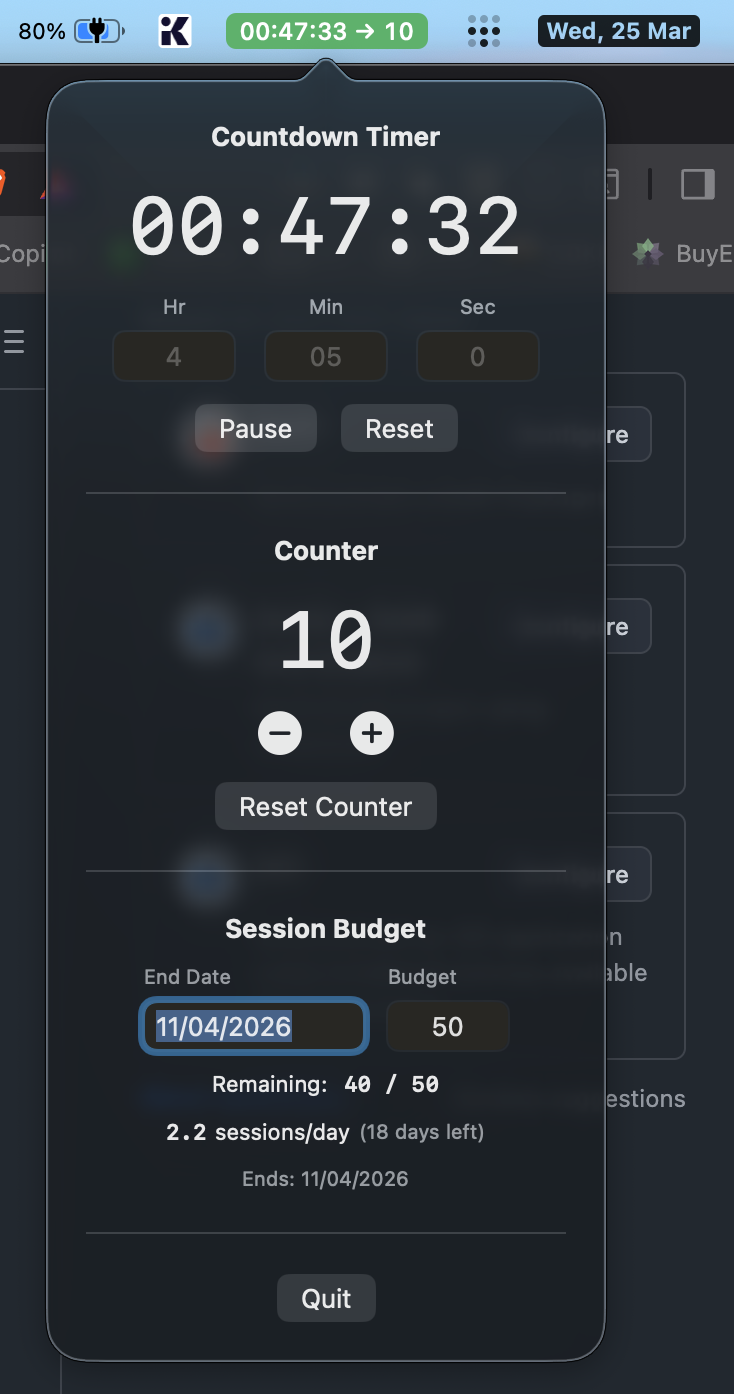
A countdown timer for tracking session duration. A counter I manually increment after each session. A session budget feature where I set an end date and it tells me how many sessions per day I need to use to stay on track.
The whole thing is five Swift files. No external dependencies. No package manager. Just SwiftUI, AppKit, and UserDefaults.
Total lines of actual logic: under 300.
What It Does
The app lives in your macOS menu bar. Click it, and you get a popover with three sections:
Countdown Timer — Set hours, minutes, seconds. Start it when you begin a session. The menu bar shows a live countdown with color coding: green when you have time, red when you’re running low.
Session Counter — Simple +/- buttons. Increment after each session. The count shows in the menu bar alongside the timer.
Session Budget — Set your billing cycle end date and total sessions (default 50). It calculates:
- How many sessions remain
- How many sessions per day you need to use to not waste any
That last one surprised me. I didn’t think I’d care about “sessions per day.” But seeing “1.5 sessions/day (30 days left)” changes how you think about your usage. It turns a vague limit into a concrete pace.
The Persistence Bug
One thing I didn’t think about initially: persistence.
I built the counter, used it for a day, quit the app, reopened it — and everything was gone. Counter reset. Timer reset. End date gone.
Of course. Everything was in memory.
The fix was UserDefaults — the simplest persistence mechanism on macOS. But here’s the subtle bug that got me: Swift’s didSet property observers fire when you set properties inside methods called from init(). So when load() set the counter value, it triggered save(), which overwrote the end date with an empty string before that field had been loaded.
Classic. The kind of bug you don’t catch until you’ve quit and reopened the app three times wondering why your date keeps disappearing.
The fix was a simple isLoading flag. Boring. Effective.
Why Not Just Use a Spreadsheet?
Because I wouldn’t use it.
The whole point is that the counter lives in the menu bar. It’s always visible. I glance up, see 00:32:15 → 12, and I know exactly where I stand.
A spreadsheet requires opening a spreadsheet. A note requires opening a note. The menu bar requires nothing. It’s just there.
That’s the difference between a tool you build and a tool you use.
It’s Open Source Now
The app is free and open source. If you’re on Claude Max or Pro and you’ve ever lost track of your sessions, this might help.
- GitHub: github.com/akbarsha03/claude-session-counter
- Download: Grab the DMG from the Releases page
It runs on macOS 14+. Clone it, build it in Xcode, or just download the DMG.
The Meta Observation
I used Claude to build a tool that tracks Claude usage.
The app was vibe coded end to end. I described features in natural language, Claude Code wrote the Swift, I tested, found bugs, described the bugs, and Claude fixed them. The whole cycle from idea to working app took less time than writing this blog post.
That’s not a flex. It’s an observation about where we are.
The bottleneck wasn’t code. It was knowing what I wanted. Once I was clear about the problem, the solution came fast.
And that tracks with something I’ve been saying for a while now: the most valuable engineering skill isn’t writing code. It’s knowing what to build.
Want to talk about building tools with AI?
If you’re exploring how to use Claude Code, Claude API, or AI tooling for your projects, I’m happy to share what’s worked for me.